Worksoft Automation Insights
Worksoft Automation Insights gives you ongoing visibility into the health and performance of your Worksoft automation programs, helping you understand where your environment needs attention and where to focus improvement efforts.
Worksoft Automation Insights provides a metrics dashboard for your Worksoft environment to improve automation performance and adhere to best practices. The metrics evaluate the automation environment state, track risks, and uncover potential problem areas.
The dashboard helps you obtain the following insight:
- Improve automation performance
- Gain visibility into test performance and execution results
- Maintain adherence to best practices
- Avoid database bloat by monitoring and identifying clean-up opportunities for obsolete tests
Automation Insights administrators gain insight into the following:
- Understand changes being made to automation and data, and who is making the changes
- Track actual concurrent Certify licenses usage across teams
- Drill down to see individual usage and identify training needs for specific users
The Automation Insights dashboard is customizable, and you can select which metrics you want to view. Daily data refresh keeps insights current and highlights when limits are exceeded.
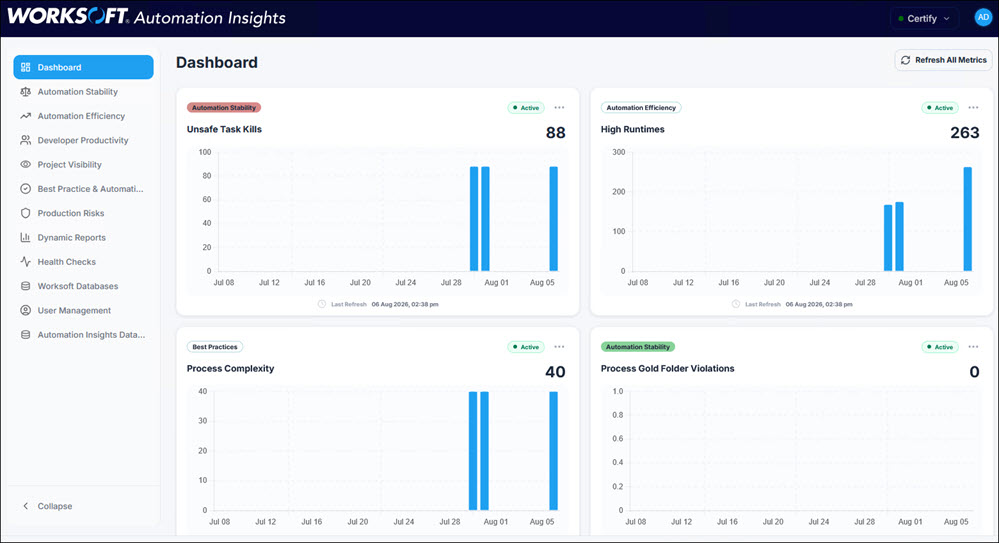
The dashboard displays 30-day trend graphs to see if your company is moving in the right direction. You can decide which metrics to view on the Configuration Settings page.
For more information, see Exploring the Worksoft Automation Insights User Interface and Configuring the Worksoft Automation Insights Dashboard.
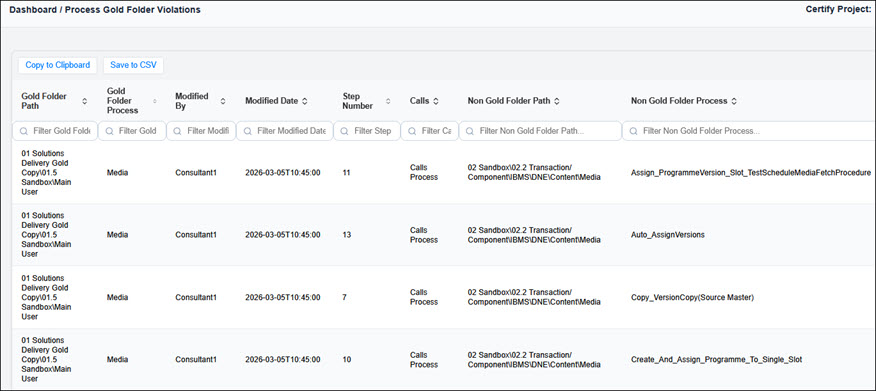
You can drill down each graph to inspect detailed elements behind any metric.
For information about getting started, see Getting Started with Worksoft Automation Insights.
PN WAI 146 08182026