Filtering Reports in Worksoft Reporting Services
In Worksoft Reporting Services, you can filter your reports in the Reports tab to find a specific report.
To filter reports:
-
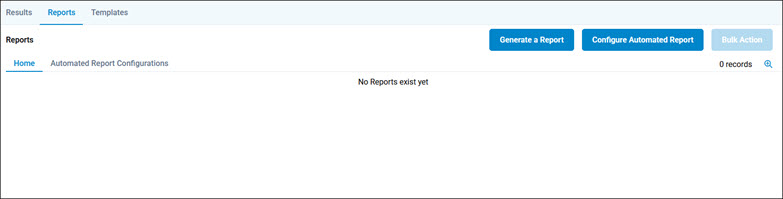
Click the Reports tab in Reporting Services.
The Reports tab opens.
-
Click the Search
 button.
The Reports Search page opens.
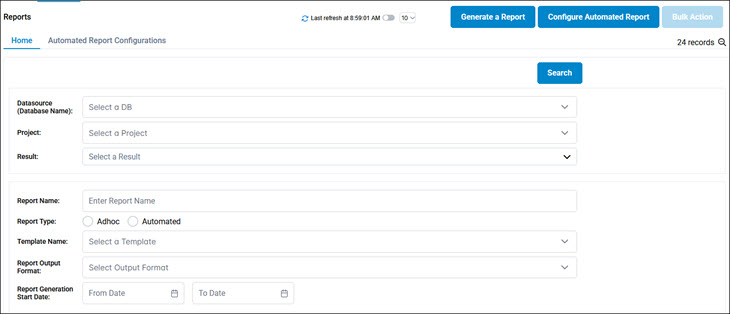
- In the Datasource drop-down list, select a database.
- In the Project drop-down list, select a Certify project.
- Select one of the following Filter By options:
- Results
- Results Folder
-
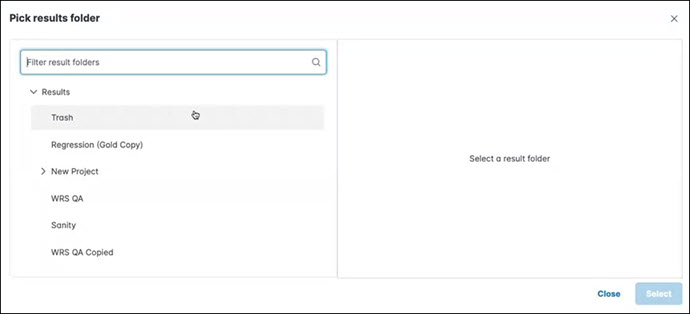
Click in the Result field.
The Pick Results Folder dialog opens.
-
Select a result and click Select.
- In the Report Name field, enter a report name.
- Select one of the following Report Type options:
- Adhoc
- Automated
- From the Template Name drop-down list, select a template.
- From the Report Archive Name drop-down list, select an archived report.
- From the Report Output Format drop-down list, select one of the following formats:
- DOC
- In the Report Generation fields, select start and end dates.
-
Click Search.
The search results appear in the Reports tab.
 Related Topics