Defining SignalR Connection Management Keys in CTM
In the Continuous Testing Manager (CTM) and the CTM Agent, you can define SignalR connection management keys to determine how often a ping message is sent over an idle connection and to set the maximum amount of time a client should wait for a message from the server.
To define SignalR connection management keys in CTM:
-
On the application server where CTM is installed, open the following directory:
C:\Program Files (x86)\Worksoft\Continuous Testing Manager
-
Open the appsettings.json file.
The appsettings.json file opens.
-
Locate the SignalR section.
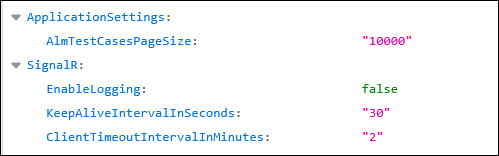
- Update the following values in the SignalR section:
-
KeepAliveIntervalInSeconds
In seconds, define how often a ping message is sent over an idle connection to keep the client and server connected.
-
ClientTimeoutIntervalInMinutes
Enter the maximum time the client should wait for a message from the server before considering the connection lost and triggering the close event.
-
Save the updated file.
To define SignalR connection management keys in CTM Agent:
-
On the machine where the CTM Agent is installed, open the following directory:
C:\Program Files (x86)\Worksoft\Worksoft Continuous Testing Manager Agent
-
Open the appsettings.config file.
The appsettings.config file opens.
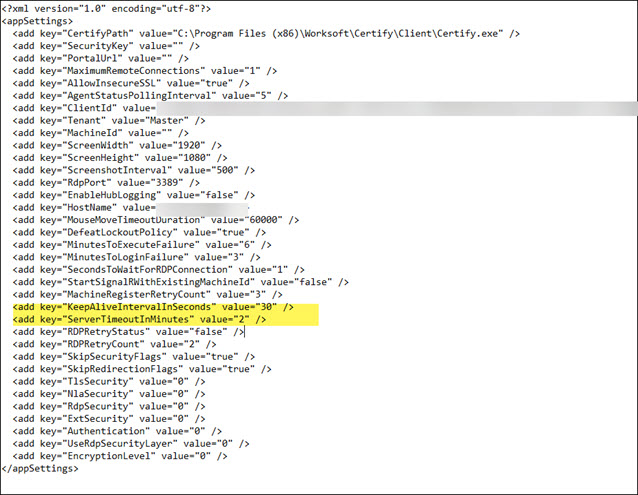
- Locate the following two keys and update the values in the SignalR section:
-
KeepAliveIntervalInSeconds
In seconds, define how often a ping message is sent over an idle connection to keep the client and server connected.
-
ClientTimeoutIntervalInMinutes
Enter the maximum time the client should wait for a message from the server before considering the connection lost and triggering the close event.
-
Save the updated file.
 Related Topics