Getting Started with Integrating Certify with OpenText Quality Management (ALM)
Worksoft Certify® integrates with the OpenText Application Quality Management (ALM) to improve SAP® testing and enhance productivity. Integrating with Certify allows ALM users to automate their SAP testing and increase productivity.
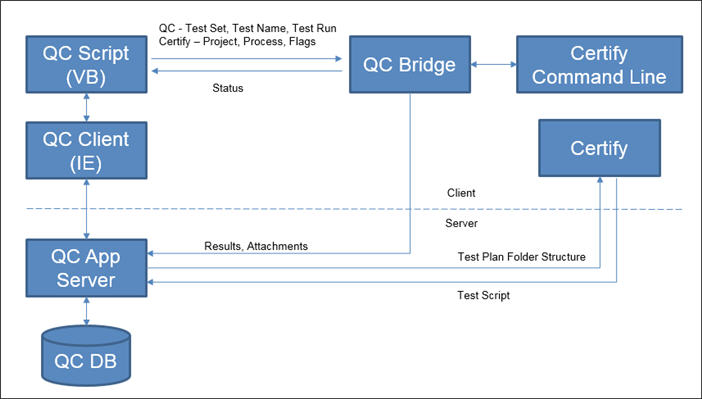
Integration with ALM is based on the Worksoft Certify command line. The current capabilities of the Certify command line limit the execution capability of ALM processes. For example, manual steps are not supported.
Worksoft Certify supports integration with ALM v12.x, v15.x, v17.x, and v25.x.
Before you can integrate Certify with ALM, you must complete the following tasks to set up your servers for integration:
- Install the ALM Connectivity Add-On Tool
- Specify a User for ALM Integration
- Create Certify Attributes for Certify Integration with ALM
- Configure Certify and ALM/Quality Center Integration
ALM Permissions
Worksoft recommends that ALM users have the default role QA Tester, which provides appropriate permissions to execute Certify processes from ALM and upload Certify execution results to ALM.
A permission error may occur when a user tries to execute Certify processes from ALM with an assigned customized role. You may be prevented from storing Certify process execution results in ALM.